---
title: Off-Season SWAT CAM Storage
description: It is recommended to store the SWAT CAM cameras in a warm dry location for the winter to preserve the life of the batteries and to ensure all images have been uploaded to SWAT Records.
---
[Skip to content](https://support.swatmaps.com/swat-cam-storage#main-content)
[My Tickets](https://support.swatmaps.com/tickets-view?hsLang=en)
[](https://support.swatmaps.com?hsLang=en)
- [SWAT MAPS PROCESSES](https://support.swatmaps.com/quick-reference-for-swat-maps-procedures)
- [On-Boarding](https://support.swatmaps.com/on-boarding-a-new-user)
Open main navigation
Close main navigation
- [SWAT MAPS PROCESSES](https://support.swatmaps.com/quick-reference-for-swat-maps-procedures)
- [On-Boarding](https://support.swatmaps.com/on-boarding-a-new-user)
- [My Tickets](https://support.swatmaps.com/tickets-view)
- [Submit A Ticket](mailto:support@swatmaps.com)
[Submit A Ticket](mailto:support@swatmaps.com)
Hello, how can we help you today?
- There are no suggestions because the search field is empty.
1. [SWAT SUPPORT](https://support.swatmaps.com/?hsLang=en)
2. [SWAT CAM](https://support.swatmaps.com/swat-cam?hsLang=en)
3. [Storage and Maintenance](https://support.swatmaps.com/swat-cam?hsLang=en#storage-and-maintenance)
# Off-Season SWAT CAM Storage
## It is recommended to store the SWAT CAM cameras in a warm dry location for the winter to preserve the life of the batteries and to ensure all images have been uploaded to SWAT Records.
### Tools Required
- 1/2” wrenches
### Instructions
1. Using two 1/2” wrenches, loosen the bolts on the front of the housing and remove the lid as shown in Figure 1.
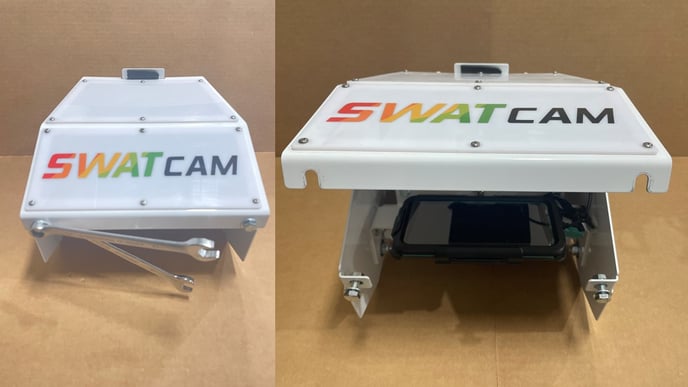Figure 1. SWAT CAM Lid Removal
2\. Disconnect the USB charging cable (**B**) from the camera and disconnect the safety tether strap (**A**) as shown in Figure 2.
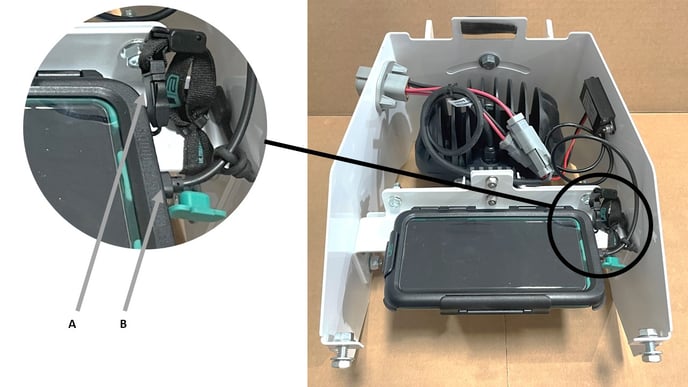Figure 2. Removal of USB Cable and Tether
**3.** If available, install the small rubber cover over the exposed USB-C connector to protect it from moisture as shown in Figure 3.
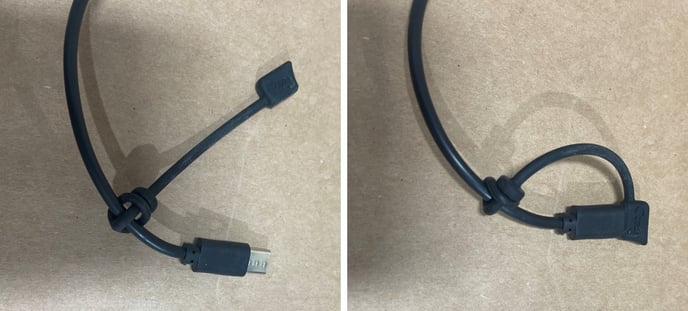
Figure 3. Installing Protective Cover over USB-C Cable.
**4.** Remove the camera case from the fixed mount by pressing (squeezing/pinching) the 2 green buttons inwards, pushing the left side of the case up and sliding the case to the left as shown in Figure 4.
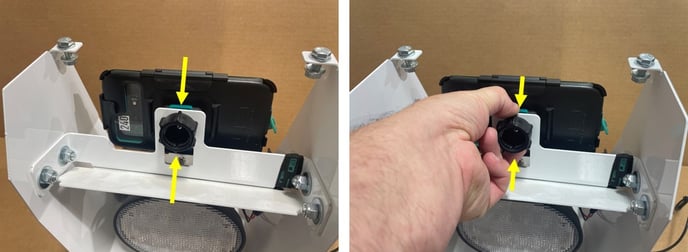
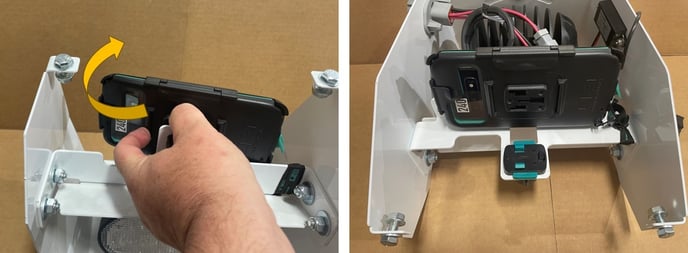Figure 4. Removing the Phone Case.
**5.** Reinstall the housing lid.
**6.** Take the cameras indoors and connect a USB-C charger cable to the phone; the phone should turn on and charge.
**7.** If there are images remaining to sync, wait for the images to sync value on screen to reach 0, then unplug from power. If in poor cellular coverage area follow these instructions to get connected to your local office Wi-Fi network for faster image syncing: [How to connect your SWATCAM to Wi-Fi](https://support.swatmaps.com/how-to-connect-your-swatcam-to-wi-fi?hsLang=en).
**8.** Store in a dry, warm area until it’s time to reinstall in the spring.
- [Frequently Asked Questions](https://support.swatmaps.com/frequently-asked-questions?hsLang=en)
- [SWAT RECORDS - Mobile App](https://support.swatmaps.com/swat-records-mobile-app?hsLang=en#main-content)
- [Getting Started](https://support.swatmaps.com/swat-records-mobile-app?hsLang=en#getting-started)
- [Farm and Account Setup](https://support.swatmaps.com/swat-records-mobile-app?hsLang=en#farm-and-account-setup)
- [SWAT Mapping and Ground Truthing](https://support.swatmaps.com/swat-records-mobile-app?hsLang=en#swat-mapping-and-ground-truthing)
- [Soil Sampling](https://support.swatmaps.com/swat-records-mobile-app?hsLang=en#soil-sampling)
- [Fertility Plans and VR Reports](https://support.swatmaps.com/swat-records-mobile-app?hsLang=en#fertility-plans-and-vr-reports)
- [Scouting and Observations](https://support.swatmaps.com/swat-records-mobile-app?hsLang=en#scouting-and-observations)
- [Mobile Troubleshooting](https://support.swatmaps.com/swat-records-mobile-app?hsLang=en#mobile-troubleshooting)
- [Geographic Information Systems](https://support.swatmaps.com/geographic-information-systems?hsLang=en#main-content)
- [As-Applied and Job Data](https://support.swatmaps.com/geographic-information-systems?hsLang=en#as-applied-and-job-data)
- [Maps and Borders](https://support.swatmaps.com/geographic-information-systems?hsLang=en#maps-and-borders)
- [SWAT CAM](https://support.swatmaps.com/swat-cam?hsLang=en#main-content)
- [Sprayer Installations - Reference Photo's](https://support.swatmaps.com/swat-cam?hsLang=en#sprayer-installations-reference-photos)
- [Getting Started](https://support.swatmaps.com/swat-cam?hsLang=en#getting-started)
- [SWAT CAM in SWAT RECORDS](https://support.swatmaps.com/swat-cam?hsLang=en#swat-cam-in-swat-records)
- [Data Interpretation](https://support.swatmaps.com/swat-cam?hsLang=en#data-interpretation)
- [SWAT CAM Reports](https://support.swatmaps.com/swat-cam?hsLang=en#swat-cam-reports)
- [Storage and Maintenance](https://support.swatmaps.com/swat-cam?hsLang=en#storage-and-maintenance)
- [Troubleshooting](https://support.swatmaps.com/swat-cam?hsLang=en#troubleshooting)
- [SWAT WATER](https://support.swatmaps.com/swat-water?hsLang=en#main-content)
- [SWAT WATER Station](https://support.swatmaps.com/swat-water?hsLang=en#swat-water-station)
- [Agronomy](https://support.swatmaps.com/agronomy?hsLang=en#main-content)
- [Soils & Fertility](https://support.swatmaps.com/agronomy?hsLang=en#soils-fertility)
- [Agronomy Meetings](https://support.swatmaps.com/agronomy?hsLang=en#agronomy-meetings)
- [Yield Analytics](https://support.swatmaps.com/yield-analytics?hsLang=en#main-content)
- [General Information](https://support.swatmaps.com/yield-analytics?hsLang=en#general-information)
- [Resources](https://support.swatmaps.com/yield-analytics?hsLang=en#resources)
- [Sales & Marketing](https://support.swatmaps.com/sales-marketing?hsLang=en#main-content)
- [SWAT CAM](https://support.swatmaps.com/sales-marketing?hsLang=en#swat-cam)
- [Sustainability](https://support.swatmaps.com/sustainability?hsLang=en#main-content)
- [Publications](https://support.swatmaps.com/sustainability?hsLang=en#publications)
- [Incentive Programs](https://support.swatmaps.com/sustainability?hsLang=en#incentive-programs)
- [Sustainability Reports](https://support.swatmaps.com/sustainability?hsLang=en#sustainability-reports)
- [SWAT CERTIFIED](https://support.swatmaps.com/sustainability?hsLang=en#swat-certified)
[](https://swatmaps.com)
### **Confidentiality, Use Restrictions, and Enforcement**
All content, materials, data, tools, methodologies, documentation, software elements, workflows, models, and information made available through this Support Portal (collectively, the “Portal Content”) are and shall remain the exclusive Confidential Information and Proprietary Data of Croptimistic Technology Inc. The Portal Content is provided on a strictly limited, revocable, and non-transferable basis solely to the Trusted Advisor entity that is party to the applicable agreement with Croptimistic (the “Partner”) and its authorized employees, contractors, and representatives (“Personnel”) for the sole purpose of performing services within the SWAT Ecosystem in accordance with the EULA and applicable Partner or Services Agreement.
By accessing this Support Portal through a unique username and password, each individual user acknowledges and agrees, on their own behalf and on behalf of the Partner, that they are bound by all confidentiality, use, and restriction obligations set out herein and in the applicable agreements. Each user further acknowledges that access is personal, non-transferable, and strictly limited to authorized purposes, and that any use of the Portal Content constitutes acceptance of these terms.
The Partner shall be fully responsible and liable for all acts and omissions of its Personnel and shall ensure that all Personnel are bound by confidentiality and use restrictions no less protective than those set out herein. The Partner and its Personnel shall not, directly or indirectly: (i) copy, reproduce, modify, extract, reverse engineer, decompile, disassemble, or create derivative works from any Portal Content; (ii) disclose, publish, distribute, sublicense, or otherwise make Portal Content available to any third party; (iii) use Portal Content for any purpose outside the scope of authorized activities; or (iv) use Portal Content to develop, support, or enable any product, service, or methodology that competes with or is similar to Croptimistic’s offerings.
Access to the Support Portal is strictly limited to Personnel who have a legitimate need to access such Portal Content for authorized purposes. Access credentials may not be shared, transferred, or used by any unauthorized person. The Partner shall implement and maintain appropriate administrative, technical, and organizational safeguards to prevent unauthorized access, use, or disclosure and shall immediately notify Croptimistic of any actual or suspected breach.
Upon termination or expiration of any agreement with Croptimistic, or upon request at any time, all rights to access and use the Portal Content shall immediately cease for both the Partner and all Personnel. The Partner shall ensure that all Portal Content in its possession or control, including that held by any Personnel, is promptly and permanently destroyed in all forms, including all copies, extracts, notes, analyses, or derivative materials, and shall certify such destruction in writing upon request. No retention rights shall apply.
Any unauthorized use, disclosure, retention, or failure to enforce these obligations by the Partner or its Personnel constitutes a material breach of the applicable agreements and may result in immediate suspension or termination of access, injunctive relief, and pursuit of all available legal remedies. No rights or licenses are granted, whether express or implied, except as expressly set out in the applicable EULA and Partner or Services Agreement, which shall prevail in all respects.
Copyright Croptimistic Technology Inc. © 2026 All Rights Reserved
[mailto:support@swatmaps.com](mailto:support@swatmaps.com)
Copyright Croptimistic Technology Inc. © 2026 All Rights Reserved